
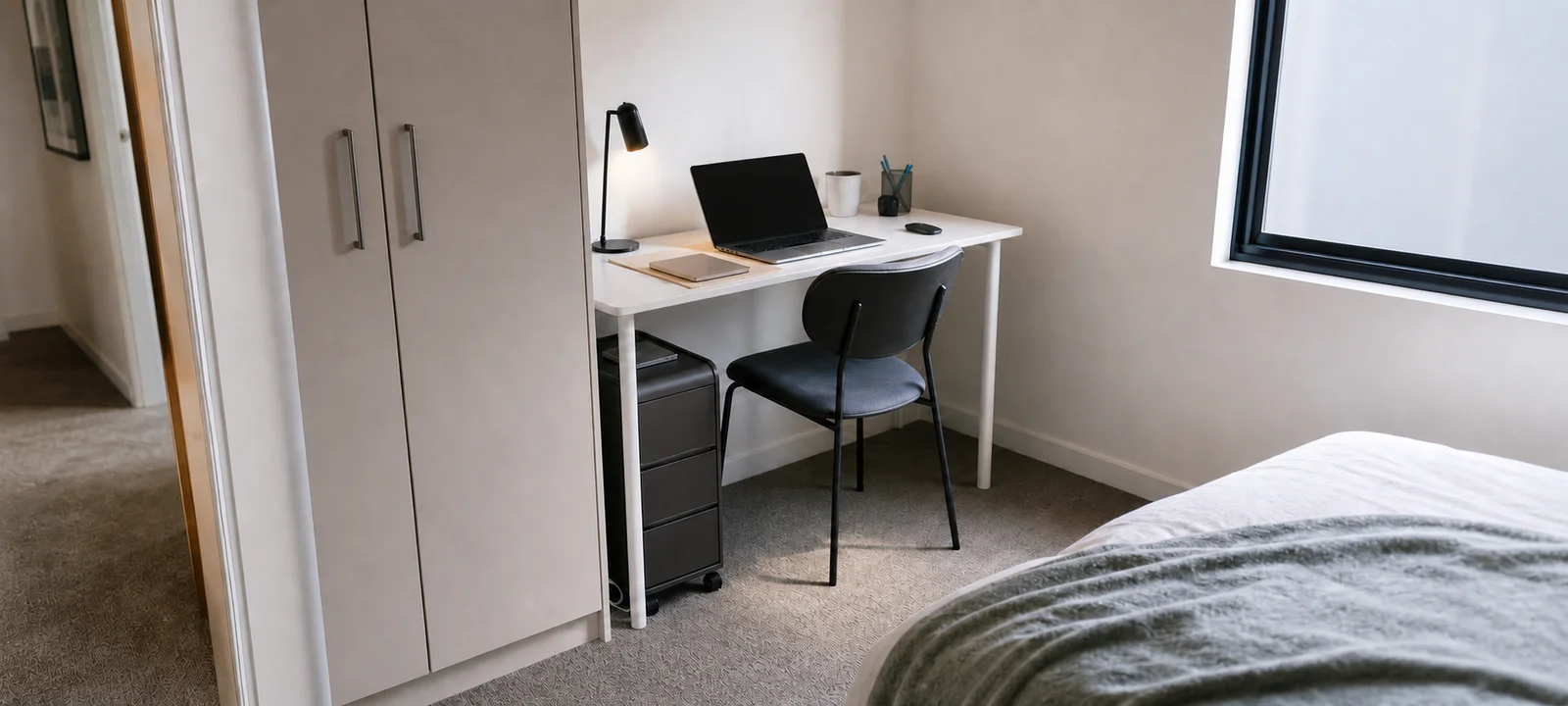
A desk in a bedroom or living room has two jobs. It must support a normal work session and give the room back when the laptop closes. A setup that succeeds at only the first job can leave the whole room feeling permanently on duty.
Before buying compact office furniture, lay out the laptop, screen, notebook, charger and anything else used through the day. Then decide where each item—and the chair—will go after work. In a small room, that off-duty state matters as much as desk width.
Plan the working and packed-away footprints
- Lay out every item used during a normal work session.
- Mark the desk, chair and walkway footprint while that equipment is in use.
- Choose where the laptop, papers, cables and chair go when work finishes.
A compact office earns its space when both versions of the room work—not only the styled desk.
Plan the workday and the pack-down together
Start with the work that actually happens. A few emails on a laptop need less surface than two screens, paper plans and regular video calls. Measure the equipment in use, not stacked neatly for the photo.
Next, picture the room at night. Can someone walk past the chair? Can wardrobe doors open? Does the dining table need to return to meals? A shared room may be better served by a modest workstation that resets easily than a larger desk with permanent overflow. The shared home office guide covers that transition in more detail.
Measure the chair position, not only the empty wall
A desk can fit against a wall and still fail once the chair is pulled out. Record the desk width and depth, then allow for the seated position, passage behind the chair, nearby doors, drawers and power points. Marking the footprint with removable tape can make the loss of floor space easier to judge.
Check delivery access and skirting boards as well. A desk measured to the last centimetre may not sit flush when a power plug, cable or deep skirting board is behind it. Use the home office desk guide for a fuller measurement list.
Choose a desk for the equipment that stays out
If a 120 × 75 cm top fits the room, test the chair-to-keyboard height next. The UpDown and Desky comparison shows why desks with the same footprint can feel very different when seated.
A narrow console-style desk may suit laptop work, but its depth can become uncomfortable once a monitor, keyboard and notebook compete for the same surface. A corner desk offers more room, yet can dominate a bedroom or make a living room corner difficult to clean.
Decide which equipment remains connected and which can be packed away. Useful desk features may include a cable opening, one shallow drawer or enough clearance for a small filing unit, but only when those features serve real work. A simple table can outperform a complicated desk if its proportions suit the room.
Make sure the chair can genuinely tuck away
Chair dimensions are easy to underestimate. Armrests may hit the underside of the desk, a wide base can catch a rug and wheels may not suit the floor. Measure the chair at its widest point and compare the seat and arm height with the desk clearance.
Comfort and adjustment matter more when the chair is used for long sessions. If the chair must also disappear from view, decide where it can park without blocking another part of the room. The office chair guide brings those checks together.
Place light before adding desk accessories
Natural light is useful until it creates glare or puts the person on a video call in deep shadow. Test the desk position at the times the room is normally used. A small change in angle can be more effective than adding another lamp.
A task light should illuminate paperwork or the keyboard without reflecting harshly in the screen. It also needs a stable base and a cable route that does not cross the work surface. See the home office lighting guide for screen, call and power point planning.
Keep the screen arrangement modest and workable
Set the monitor where it can be viewed comfortably without forcing the keyboard to the front edge or turning the chair into a walkway. A laptop stand may free some space, but usually creates a need for a separate keyboard, mouse and more cables. Count the whole arrangement before deciding it is compact.
Video calls add a second viewpoint: what the camera sees. Avoid buying decorative background storage before testing the existing wall, light and camera angle. The video call setup guide focuses on that zone.
Give cables a route you can still reach
Cable management should keep cords out of feet and make cleaning easier without sealing away the connections that need regular access. Start at the power point, trace each device cable and leave enough slack for equipment that moves.
Grouping cables, mounting a suitable power board or adding a small under-desk tray can help, provided products are used as instructed and the power point is not overloaded. Do not run cords under rugs or across doorways. The home office cable management guide covers access, heat and cleaning; a workstation sharing the living room may also benefit from the living room cable management guide.
Separate active work from stored paperwork
The surface should hold what is needed today, not every document the household owns. Keep active papers in one tray or folder and move reference material, records and supplies to a separate home. This makes packing up at the end of the day a simple transfer, not a sorting session.
Use vertical shelves only when the wall, fixings and rental conditions suit them. A mobile drawer unit, document box or existing cupboard may provide safer and more flexible storage. The home office storage guide helps separate current work, household records, tech and stationery.
Keep daily tools within one reach
Pens, headphones, chargers and notebooks need a small landing place, but a row of organisers can consume more desk space than the items themselves. Begin with one drawer, cup, tray or caddy. Add divisions only after the pattern of use is clear.
Printers and occasional equipment do not automatically deserve prime desk space. If an item is used weekly rather than hourly, a nearby cupboard or trolley may be more sensible.
Control noise and visual spill with routines first
A screen, headphones or closed door may help with interruptions, but the room still needs to work for everyone who shares it. Agree on call times, storage boundaries and when the desk is available for another purpose before buying partitions or acoustic accessories.
At the end of the day, close files, return the few daily tools, connect devices that need charging and clear the chair. If that takes much more than a few minutes, the storage may be too far away or the desk may be holding items that do not belong there.
Before another office item enters the room
- Check the item's full footprint in use, including doors, drawers and cable clearance.
- Confirm it solves a repeated work problem rather than filling an empty corner.
- Decide where it sits when work finishes.
- Keep walkways, wardrobes, windows and power points accessible.
- Prefer a short reset over storage that creates more steps.
A compact home office works when it supports concentration without claiming the entire room. The best sign is not a perfectly styled desk; it is a workday that starts without searching for equipment and ends without leaving the bedroom, living room or dining area in office mode.
Common Questions
What are the best small home office ideas for a shared room?
Plan work mode and home mode together. Choose a desk for the equipment that stays out, protect enough space for the chair to move, place light before accessories and give active tools one reachable zone. A defined pack-down destination lets a bedroom, dining area or living room recover after work.
How do I create a temporary office setup that packs away quickly?
Keep the working kit modest: the necessary computer equipment, one cable route, a suitable chair and a container for items that leave the surface. Rehearse the changeover before adding furniture. The setup is genuinely temporary only when every piece has an off-duty location and the room can reset without reshuffling clutter.
Where can I put a home office when I have no spare room?
Look for a zone that can support desk depth, chair pull-back, power and useful light without blocking the room's main route. A bedroom wall, dining-area edge or living room corner may work if the furniture has a practical off-duty state. Measure the occupied chair position, not just the empty wall.