
Compare product fit and check retailer availability
Living-room cables rarely become a mess all at once. A console joins the television, then a soundbar, router, lamp and phone charger all compete for the same power point and the narrow gap behind the cabinet.
Trace every device back to power before buying a box, sleeve or bundle of clips. Remove unused leads and note which connections need regular access. The aim is a setup that is easier to use and clean, not one that hides every cord at any cost.
Keep plugs, power boards, ventilation and frequently changed connections reachable. Hidden is not the same as well planned.
Start With the Devices, Not the Organisers
List everything that uses power in the room: television, soundbar, gaming console, streaming device, router, speakers, lamps, phone chargers and any charging docks. Include equipment used only occasionally, such as a laptop charger, rather than discovering its cable route later.
Separate permanent connections from cords that are regularly unplugged or moved. A television lead may stay untouched for months; a controller cable or laptop charger needs a convenient return point. Those two jobs should not be forced into the same tightly bundled route.
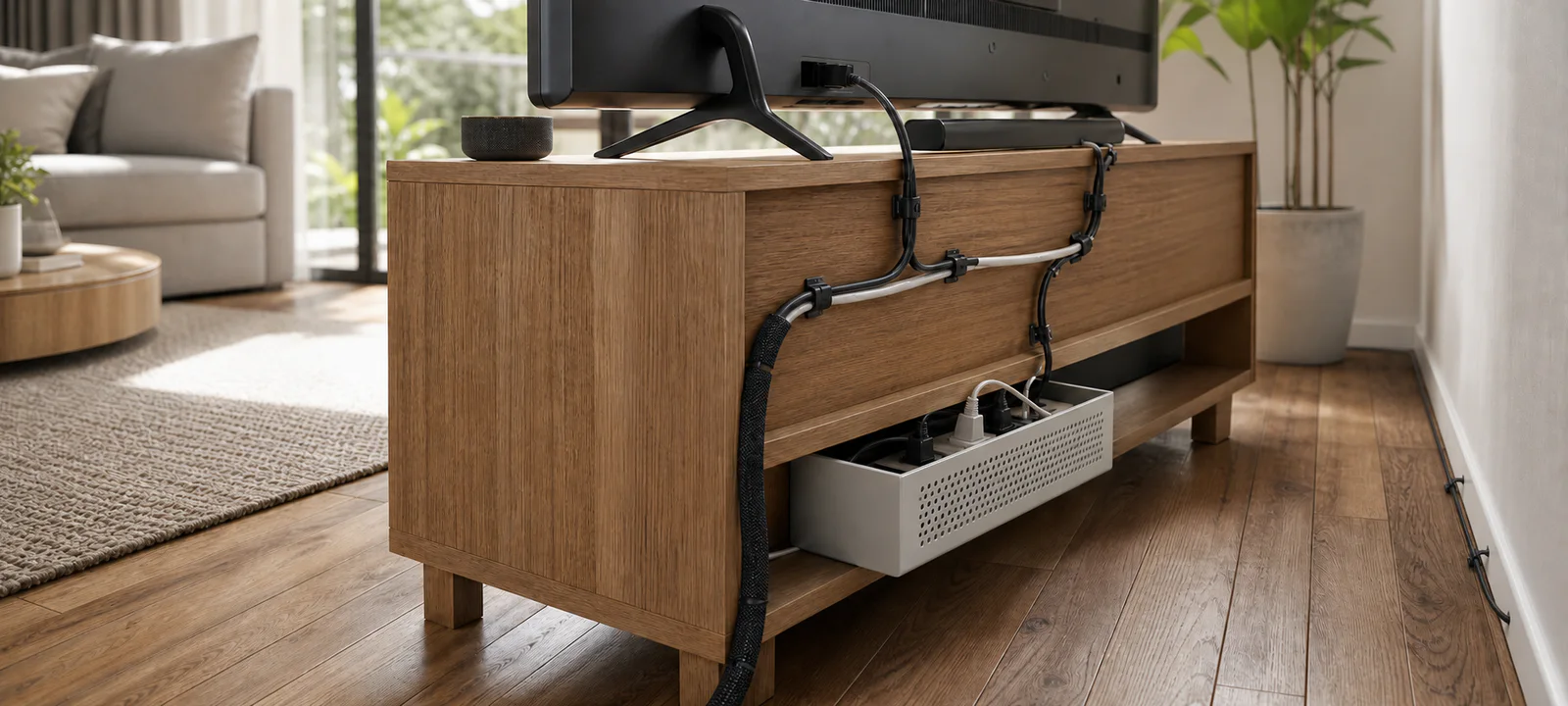
If most of the tangle sits around the television, use the TV unit and media storage guide to check device depth, cable openings and rear access before adding organisers.
Map the Route to Power
Mark the existing power points and place the furniture as it is normally used. A point behind a cabinet is not genuinely convenient if the cabinet must be emptied and moved to reach it. Nor is a point beside a balcony door useful when the cord would cross the route outside.
Keep power boards accessible for switching, inspection and cleaning. Follow the instructions supplied with power boards, chargers and electronics; do not overload them or cover powered equipment in a way the manufacturer warns against. Keep liquids away from electrical items.
A cable organiser cannot correct a poorly placed or inadequate electrical supply. Moving furniture or adding removable, non-electrical wraps and sleeves is not the same as altering an electrical installation. Do not modify plugs, leads or wiring, and obtain rental approval before permanent changes.
Leave Working Space Behind the TV Unit
Cable openings help only when they align with the equipment and wall points. Measure the plugs as well as the leads: a cabinet may accommodate a thin cable but not the connector that must pass through its opening.
Check the space behind the furniture before pushing it back. Cables should not be forced into sharp bends or crushed against the wall. Open shelves expose more wiring but can improve access; closed cabinets calm the view but may make connections, cleaning and equipment ventilation harder.
Label similar leads at both ends and leave enough access to remove one device without dismantling the entire setup. Wall-mounted televisions still need a safe cable plan; use qualified help for mounting, in-wall cabling and electrical work where required.
Give Changing Equipment a Flexible Route
Gaming consoles and controller docks often need front access, USB ports or room for removable storage. Streaming devices add small power and HDMI leads that are easy to forget until the cabinet is back against the wall. Follow each device's placement and clearance instructions.
Reusable wraps and clear labels usually age better than a rigid bundle. They allow one console, soundbar or streaming box to change without disturbing everything else. Keep the router or modem reachable for checking connections and indicator lights.
Cable boxes for two different loads
Measure the power board with every plug connected before you compare these two box sizes. They contain loose power-board clutter; they do not extend a lead, add outlets or replace ventilation and access.
Some links below are affiliate links. We may earn commission at no extra cost to you. Learn more.
Compare the fit, main drawback and retailer availability for each option.
| Option | May suit | Check first | Retailer prices and availability |
|---|---|---|---|
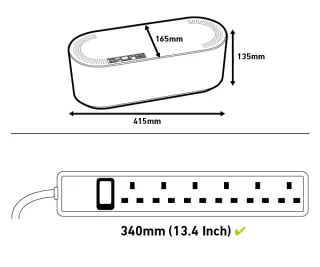 D-Line Large Cable Tidy Box Cable management box D-Line Large Cable Tidy Box Cable management box | larger power boards with several low-load plugs | It hides rather than shortens cables, and heat-producing power equipment still needs ventilation. | |
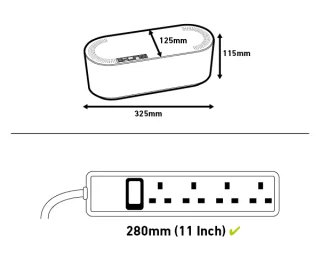 D-Line Small Cable Tidy Box Compact cable management box D-Line Small Cable Tidy Box Compact cable management box | small setups with a short compact power board | The smaller internal volume will not accommodate large transformers or crowded boards. |

More about each option
Cable management box
D-Line Large Cable Tidy Box
A large ventilated enclosure for a measured power board and excess cable, intended to reduce visual clutter around a power board.
Check today’s price and postcode delivery:
We may earn commission through these links.
Good fit for
larger power boards with several low-load plugs
Check before buying
It hides rather than shortens cables, and heat-producing power equipment still needs ventilation.
Research-supported option
More suitability and drawbacks
May suit: larger power boards with several low-load plugs.
May not suit: oversized adapters or equipment requiring open airflow.
Drawbacks to consider:
- It hides rather than shortens cables, and heat-producing power equipment still needs ventilation.
- Current dimensions, variant, price, stock and seller details should be rechecked before ordering.
Evidence confidence: moderate. Last reviewed 22 August 2026. Research-based assessment; we have not tested this product firsthand.
Compact cable management box
D-Line Small Cable Tidy Box
A compact enclosure for a small power board after plug height, cable exits and access to the board have been mapped.
Check today’s price and postcode delivery:
We may earn commission through these links.
Good fit for
small setups with a short compact power board
Check before buying
The smaller internal volume will not accommodate large transformers or crowded boards.
Research-supported option
More suitability and drawbacks
May suit: small setups with a short compact power board.
May not suit: multi-monitor setups with bulky power bricks.
Drawbacks to consider:
- The smaller internal volume will not accommodate large transformers or crowded boards.
- Current dimensions, variant, price, stock and seller details should be rechecked before ordering.
Evidence confidence: moderate. Last reviewed 22 August 2026. Research-based assessment; we have not tested this product firsthand.
Plan Lamp and Charging Leads Around Movement
A lamp on the far side of the sofa can create the longest cord run in the room. Trace that route past recliners, rug edges, sliding doors and the paths people use to reach the hallway or balcony. Do the same for chargers used from the sofa.
A side or console table can hold a charging point when it sits near suitable power. The living room tables guide covers surface space and compartments, while the living room lighting guide helps with lamp placement, glare and power access.
Clips and sleeves should not make a lead difficult to unplug or turn a loose cord into a rigid obstacle. Check surface compatibility before applying adhesive products, particularly in a rental.
Match the Organiser to the Problem
- Reusable wraps: group leads that follow one route and may change later.
- Labels: identify similar connections without tracing them behind furniture.
- Sleeves: contain several parallel cords, with slower access to each one.
- Clips: guide a single light lead or charger along a compatible surface.
- Trays: lift a group of cords from the floor when the desk or unit suits the fixing.
- Cable boxes: reduce visual clutter only when the power board remains suitable, ventilated and reachable according to its instructions.
- Floor covers: protect a short unavoidable crossing, provided the cover does not become a trip point itself.
For a power board that needs an enclosure, the cable box comparison explains two sizes and their limits. The same plug, ventilation and access checks apply behind a TV unit.
Keep Small and Shared Rooms Adaptable
In a compact apartment, a cable route can influence the entire furniture plan. Mark the TV unit, sofa, rug and main walkway before committing to a route. Fewer permanently connected devices may be more workable than squeezing another power board into a crowded corner.
Renters should favour reversible options and check the agreement before drilling or fixing channels. Adhesive products can still mark paint and joinery. If furniture placement is part of the problem, the sofa and seating layout guide helps protect walkways before cords are routed.
Account for Children, Pets and Daily Cleaning
An organiser does not remove the need to manage chewing, pulling or access concerns. Keep batteries and small accessories out of children's reach, follow product guidance and arrange the room so loose leads do not invite attention from pets.
Leave enough access to vacuum or wipe behind furniture. Pet hair, dust and toy pieces collect around leads, boxes and power boards. If chargers and controller docks are also spreading across the room, the living room clutter control guide can help define a shared return point.
Test the Setup Before Fixing It in Place
Connect the planned equipment, sit in the usual seats and use each device. Then unplug the item most likely to change. If reaching it requires moving heavy furniture or opening an entire bundle, revise the route before securing anything.
Check that the main walkway and rug edges remain clear, the power board is reachable and the TV unit can be cleaned around. Confirm that doors, recliners and drawers cannot catch a cord. Only then add wraps, clips or a tray.
Living-Room Cable Checklist
- List every device in the living room.
- Separate devices that remain plugged in from chargers used only occasionally.
- Map power points, furniture, walkways and rug edges.
- Check front, rear and ventilation access for each device.
- Measure plugs and cable openings, not just the leads.
- Check manufacturer instructions for electronics, chargers and power boards.
- Keep power boards accessible and avoid overloading them.
- Keep liquids away from electrical items.
- Choose organisers that allow one device to change later.
- Check surface compatibility before using adhesive products.
- Avoid drilling or permanent changes in rentals unless approved.
- Check the local regulator and use the correctly licensed person for regulated electrical work.
- Reconnect and test the full setup before fixing the route in place.
Keep Power Boards and Connections Reachable
The most durable cable plan is usually simple: short sensible routes, clear labels, accessible power and enough flexibility for the next device. When a hidden solution makes cleaning, unplugging or inspection harder, a small amount of visible cable is the better compromise.
Common Questions
How can I hide living room cables without losing access to them?
Trace every device to its power point first, then group only the leads that follow the same route. Use a sleeve, clips, tray or cable box for that specific problem while leaving plugs and connections reachable. A tidy cover is unhelpful if the whole setup must be dismantled whenever equipment changes.
What is the best way to manage cables behind a TV unit?
List the television, streaming devices, sound equipment, consoles and chargers, then map their power and data connections. Leave working space for ventilation, plugs and future changes behind the unit. Secure slack without tightly stretching leads, and test that each device can be removed before fixing any organiser permanently.
How do I keep lamp and charging cables out of living room walkways?
Place lamps and charging points with the normal walking route, chair movement and cleaning routine in view. Where possible, use power close to the item instead of sending a lead across open floor. Mark the proposed route temporarily and live with it before installing clips or covers that restrict later furniture changes.