
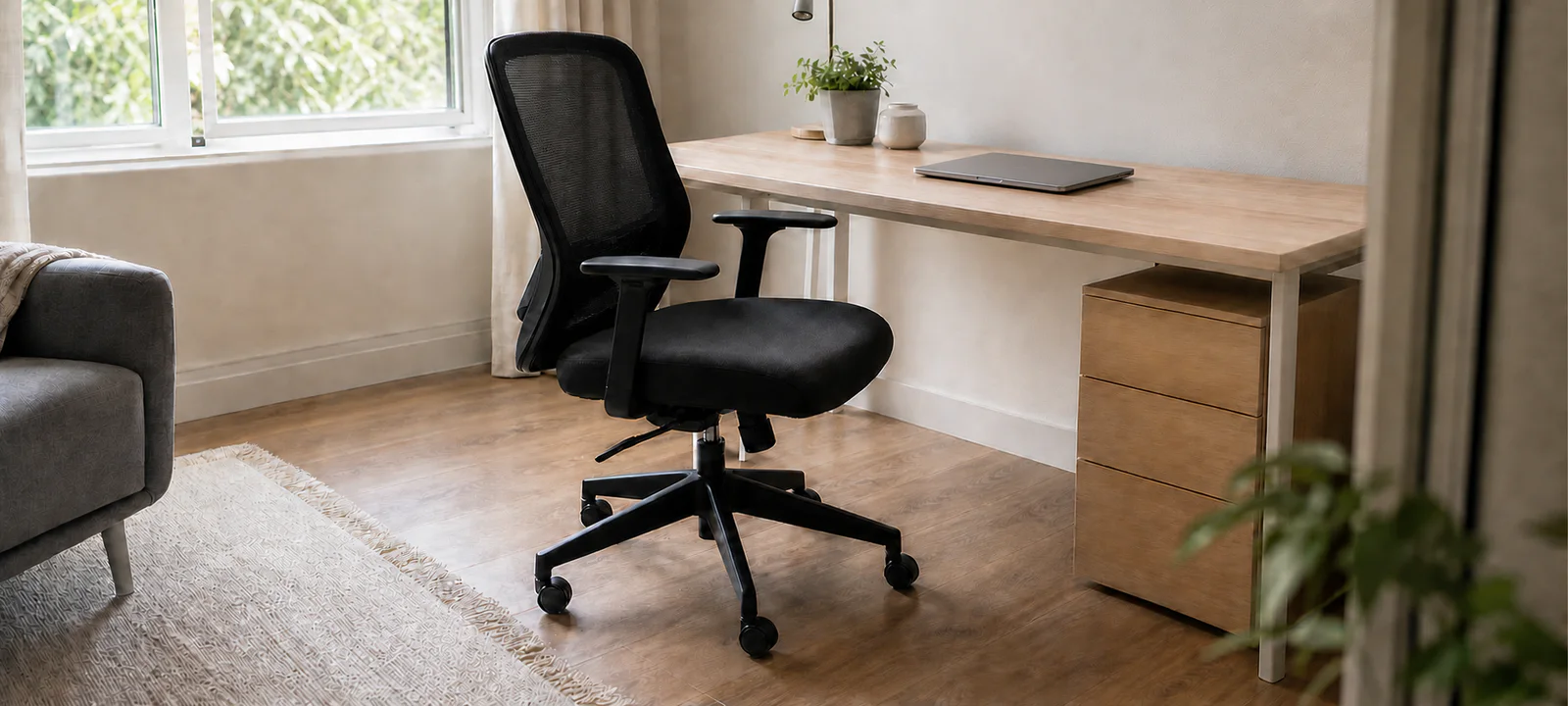
See SIHOO M57 Mesh Office Chair — Black and retailer availability
The chair is the moving half of a home office footprint. It slides under the desk, pulls out for work and needs room behind it for someone to sit or pass. Measuring it as a static object misses most of the space it uses.
Check the desk height, legroom and space between any drawers or supports. Then test the chair on the actual floor and consider how long it will be used. A large chair may suit a dedicated office and overwhelm a bedroom corner.
Measure desk and chair together. If lighting shares the zone, the home office lighting guide covers screen glare, cord paths and small-desk placement.
Choose the Chair and Desk as a Pair
Start with the clear opening beneath the desk. Measure its height, width and depth between any legs, drawers, crossbars and cable trays. Then compare those figures with the complete chair, including armrests and the widest part of the base.
A chair can appear compact while tucked under a display desk and occupy far more room when someone sits down. The home office desk guide covers the full furniture and equipment footprint.
Let Use Time Guide the Level of Adjustment
A seat used for occasional household admin has a different job from one used through a full workday. For regular computer work, the chair needs to be adjustable to the person and the work surface, not merely described as ergonomic.
WorkSafe Queensland's chair selection and adjustment guidance notes that people differ in size and that the seat pan, backrest and lumbar support need to fit the user. It also explains adjusting chair height to the working surface. Trial the chair where possible and learn how its controls work.
Individual needs, existing pain, disability or a specialised work setup may require an assessment by an appropriate professional. A general buying guide cannot determine clinical suitability.
Measure the Chair in Motion
Mark the chair base on the floor, then add the space needed to pull out, turn and sit down. Check nearby wardrobes, drawers, beds and door swings. In a shared room, leave enough space for someone to pass without squeezing behind the user.
Armrests often decide whether a chair can tuck under a compact desk. Compare their lowest and highest positions with the underside of the desktop. Allow for handles, controls or supports that extend beyond the quoted seat width.
If lighting shares the same tight zone, keep lamp bases and cords clear of the chair's movement.
A mesh chair to assess for fit
The Black SIHOO M57 is worth considering for upright work if you like mesh and firm lumbar support. It has 3D armrests and an adjustable headrest, but the seat depth is fixed. Owners and a hands-on reviewer describe fit limits around the seat edges, lumbar pad and headrest, particularly for taller users. Check the actual chair at your desk where possible, and read return-freight conditions before assembly. The current SIHOO AU offer has an Australian support route; that does not make comfort universal.
A mesh chair to compare with your seated measurements
Before choosing a chair, check seat fit, arm clearance and the cost of returning it if it is uncomfortable. Compare the adjustments and limitations below against your own desk. This is research-based advice; AHC has not tested the chair firsthand.
Some links below are affiliate links. We may earn commission at no extra cost to you. Learn more.
Adjustable mesh office chair
SIHOO M57 Mesh Office Chair — Black
A full-mesh chair with adjustable lumbar support, headrest and 3D armrests for upright desk work. Consider it only after checking the fixed seat fit and arm clearance: the firm lumbar pad and seat edges are not comfortable for everyone.
Check today’s price and postcode delivery:

We may earn commission through these links.
Good fit for
desk users who prefer breathable mesh and firm, adjustable lumbar support
Check before buying
The seat does not slide to adjust depth. Owners describe pressure from the seat edges and lumbar pad; a height recommendation alone cannot establish fit. Try the chair where possible and check your thighs, knee clearance and headrest position.
Research-supported option
More suitability and drawbacks
May suit: desk users who prefer breathable mesh and firm, adjustable lumbar support; buyers able to check fit and the seller’s return conditions before assembly.
May not suit: taller or broader users needing more headrest reach or a sliding seat; people seeking soft cushioning, gentle lumbar contact or a guaranteed free home trial.
Drawbacks to consider:
- The seat does not slide to adjust depth. Owners describe pressure from the seat edges and lumbar pad; a height recommendation alone cannot establish fit. Try the chair where possible and check your thighs, knee clearance and headrest position.
- A hands-on reviewer around 183cm tall found support limiting. Some owners report squeaks, basic castors and a firm headrest. These are reasons to check fit and construction, not evidence of a measured failure rate.
- Assembly can be fiddly. Change-of-mind returns are conditional; an Australian owner reported expensive return freight. Do not assume a free assembled-chair trial.
- SIHOO Australia states three-year defect cover for this model and coverage through its listed official marketplaces. Keep proof of purchase and use the SIHOO AU seller/support route; normal wear and misuse are excluded.
Evidence confidence: moderate. Last reviewed 26 October 2026. Research-based assessment; we have not tested this product firsthand.
Read the Dimensions as a Set
Overall width tells you whether the chair fits the room; seat width and depth help determine whether it fits the user. Back height affects support and how visually dominant the chair feels. Seat-height range must work with the desk as well as the person.
Check product specifications rather than estimating from photographs. Record the seat-height range, seat dimensions, backrest size, armrest range, base diameter and total depth. Confirm the load rating and assembly requirements for the actual model.
Adjustment only helps when its range includes the intended user and desk. More levers are not a substitute for basic fit.
Test the Floor Before Adding a Mat
Castors that move smoothly on one floor may resist or travel too freely on another. Test the chair on the actual carpet, rug, tile, laminate or timber floor where possible. Check both the chair manufacturer's advice and the flooring care guidance.
A chair mat can protect or define the zone, but it is another measured layer. Its material must suit the floor, lie flat and remain clear of doorways and walkways. Do not assume a universal mat is suitable for every finish.
Fixed legs avoid rolling but still need suitable glides and enough room to reposition the seat. Rugs that bunch or catch under the chair are a sign to change the floor setup, not force the chair across them.
Compare Seating Types by the Work They Support
- Adjustable office chair: suits regular computer work when its ranges fit the user and desk.
- Compact task chair: reduces room bulk but may offer fewer adjustments.
- Dining chair: may serve short occasional tasks when its height and support suit the setup.
- Fixed-leg chair: looks quieter in a shared room but takes more effort to reposition.
- Folding chair: packs away for occasional work but still needs to be stable and suitable for the task.
- Stool or sit-stand seat: belongs only in a compatible work setup, not as a general space-saving substitute.
Make the Chair Live With the Rest of the Room
A bedroom chair must coexist with wardrobe doors, bedside access and the route around the bed. If work furniture is displacing everyday storage, the bedroom storage guide can help rebalance the room before another item is added.
In a living or dining area, consider how the chair looks and where it sits outside work hours. A folding or dining chair only saves space if there is a genuine place to return it. A large office chair left in a walkway is not a pack-down solution.
Renters generally have fewer concerns with freestanding seating, but chair mats and glides can still affect floors. Check the lease and product guidance before making any fixed change.
Choose Upholstery for the Household
Fabric and mesh can collect dust, lint and pet hair. Coated surfaces may wipe clean more easily, but their care requirements and wear vary. Light colours show marks; dark fabrics often reveal lint. Check the manufacturer's cleaning instructions before choosing.
The base and castors need maintenance too. Hair and dust gather around moving parts, and an overcrowded desk zone is difficult to vacuum. Allow cleaning access when marking the chair footprint.
Add Accessories Only After the Basic Fit Works
A cushion changes seat height and usable depth. A footrest occupies the same floor zone as the chair base and may affect pull-out space. Neither should be used to disguise a chair that is the wrong basic size for the user or desk.
Keyboard trays, monitor arms and under-desk cable trays can also alter clearances. Follow their installation and load instructions. If leads or a power board sit near moving castors, the home office cable management guide helps keep the chair route and cleaning access clear.
Office Chair Checklist
- Match the chair to the work duration and tasks.
- Measure desk height and the clear opening underneath.
- Record overall chair width, depth, base diameter and seat-height range.
- Check armrests at their lowest and highest positions.
- Mark pull-out, turning and sitting space on the floor.
- Check whether the chair blocks doors, wardrobes, beds or walkways.
- Confirm castor, glide and mat suitability for the floor.
- Check the load rating, assembly instructions and care requirements.
- Trial the chair and its adjustments where possible.
- Decide where it sits when work finishes.
- Seek appropriate advice for individual health, disability or workplace needs.
Check Fit at the Desk, Not in Isolation
The right chair must fit three things at once: the person, the desk and the room in use. Check its adjustment range and support, but also make sure it can move without blocking household access. A chair that works only in the product photograph does not work in the home.
Common Questions
How do I choose an office chair that fits my desk?
Treat the chair and desk as one setup. Check whether the seat height supports a comfortable working position, whether armrests clear the desktop, and whether knees and legs fit underneath. Test adjustments while sitting at the actual desk rather than judging the chair in open showroom space.
How much space does a home office chair need?
Measure the chair at its widest point and include the space needed to pull back, turn and enter the seat during a normal work session. Mark that moving footprint on the floor with the desk in place. A chair that tucks under when empty may still block a door or walkway when used.
Do I need a chair mat for a home office?
Test the chair on the existing floor before buying a mat. Consider wheel movement, floor protection, noise, edges and whether the mat creates a trip point in a shared room. Choose a product compatible with the floor and chair only after the basic seating position and movement space have proved workable.